How to back up your TPT store before December 31
TPT's new seller terms take effect on January 1, 2027 (what changes). Whatever you decide (Exclusive, Basic, or moving elsewhere), it's worth having a complete copy of your store on your own computer. TPT has no "export my store" button, so here are two ways to make one.
What a complete backup includes
| Part of your store | Where it lives | How to save it |
|---|---|---|
| Product files (PDF, ZIP, slides) | Your computer, Google Drive or Canva, where you made them | Copy your originals into one backup folder. Re-download any you're missing from TPT. |
| Listing text: titles, descriptions, prices, grades, subjects, standards | Only on TPT | Copy by hand, or with Storeroom (below) |
| Covers, thumbnails and previews | Only on TPT, unless you kept your originals | Save from each product page, or with Storeroom |
| Store profile, categories, social links | Only on TPT | Copy by hand, or with Storeroom |
The listing text is the part sellers usually don't have anywhere else, and the part that takes longest to recreate: years of carefully written descriptions, tags and prices.
Option 1: Storeroom (fastest)
- Install Storeroom for Chrome or Edge. Get Storeroom
- Sign in to TPT as your seller account, in the same browser. Storeroom never asks for your password.
- Open your store page (
teacherspayteachers.com/store/your-store-name). A Storeroom card appears in the bottom corner. - Press "Back up my store." Storeroom first finds every product (20 per page), then reads each product page for the full description and details, one page about every 3 seconds. 1,000 products take a little under an hour. Keep that tab open; use other tabs as usual. Pause any time, and it picks up where it stopped.
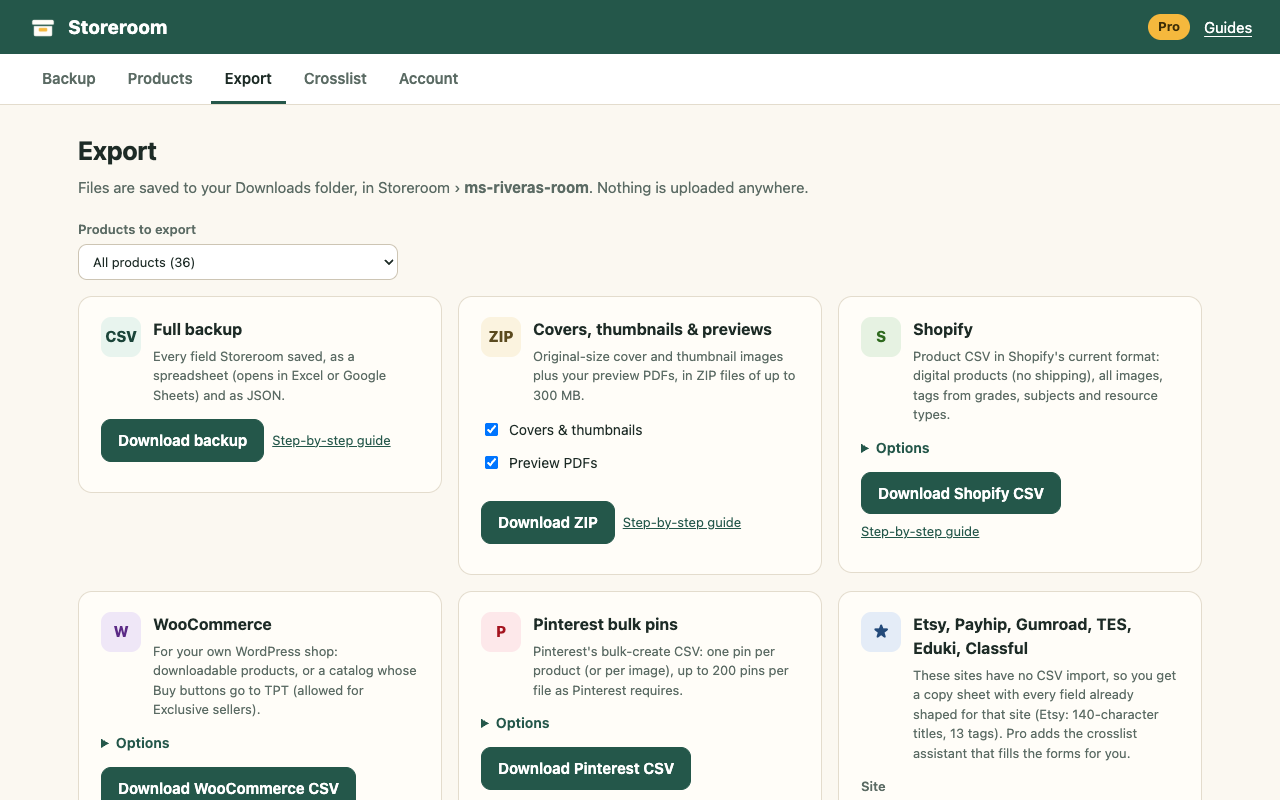
- Open Storeroom › Export and download:
- Full backup: a spreadsheet (Excel / Google Sheets) and a JSON file with every field.
- Covers, thumbnails & previews: ZIP files with every image and preview PDF, plus an index.
The free plan backs up full details for 25 products, so you can check everything works with your store. Pro ($29 once) backs up the rest.
Option 2: By hand
For a small store, you can do it manually:
- Make a spreadsheet with columns for title, price, grades, subjects, resource type, standards, and the TPT link.
- Open each product (from your store page), copy the title and description into the sheet. Paste descriptions into a document if you want to keep the formatting.
- Right-click each thumbnail › "Save image as…" and download each preview.
- Collect your original product files in one folder.
Expect about 3 to 5 minutes per product.
Store your backup safely
- Keep two copies: one on your computer and one in cloud storage (Google Drive, OneDrive or Dropbox).
- Make a fresh backup after you add or update products, and once more before December 31.
- Never give your TPT password to a tool or a person offering to "move your store". Storeroom doesn't need it.